


Professions/AI Designer

AI Designer · free course

Get AI design skills
that pay $79K a year4

Make the visuals online stores pay for: brand, product photos, posts and ads. Use them to get hired, freelance or launch your own product.

Just your email · Instant access · No card

  • 12 lessons
  • On your phone
  • No drawing skills
  • Certificate
  • Free practice store

Design now runs on AI. Designers who use it earn more

Clients spend more on AI visuals every year, and pay more for people who can make them. Here is what the numbers say

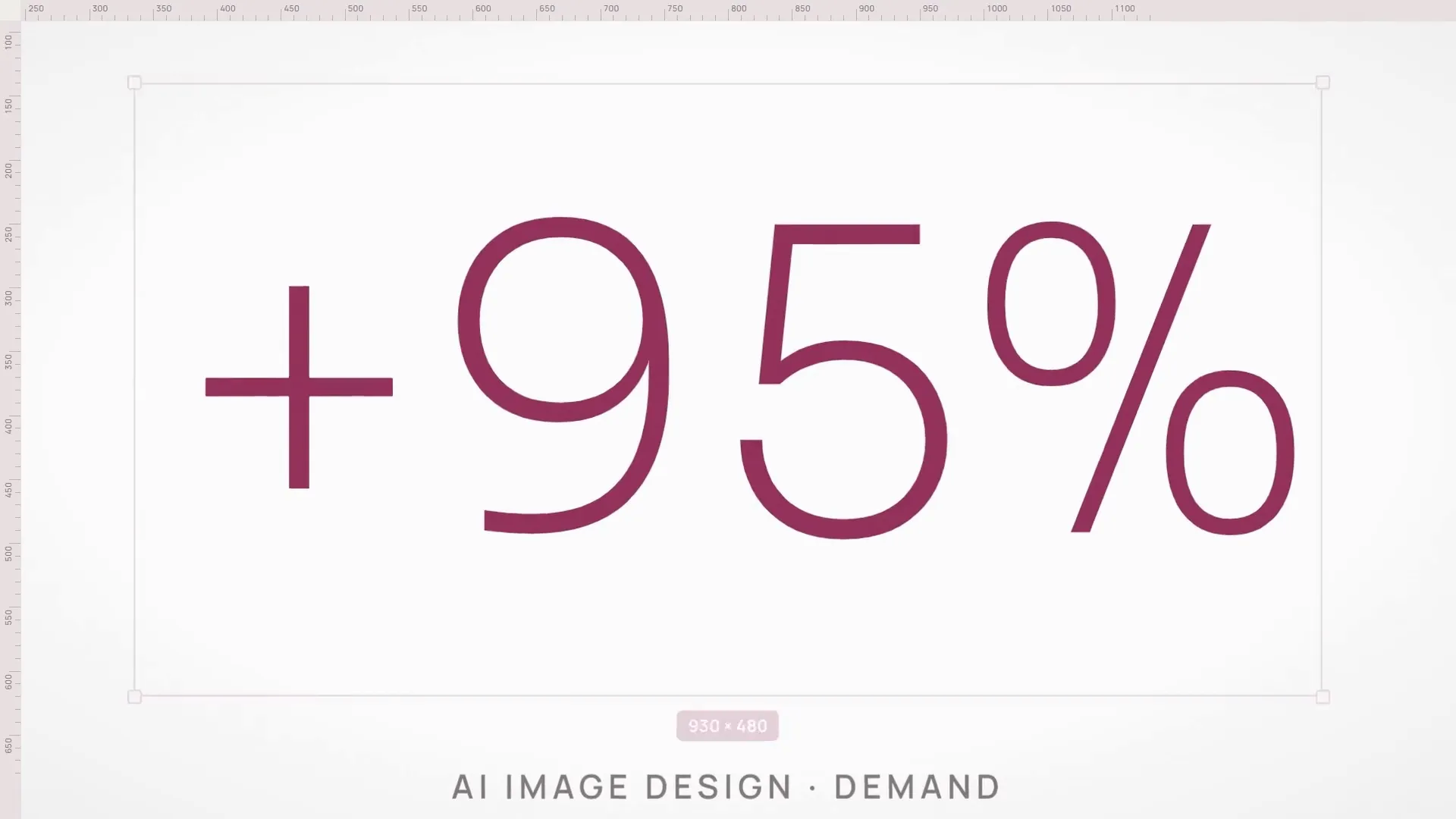
Upwork · paid client work+95%1

more spent by clients on AI image work in one year

Logo design · Upwork+44%1

more paid logo work in a year, even though AI can draw a logo in seconds

+56%3

higher pay for jobs that need AI skills

vs $62,960 for all graphic designers2$79.1K4

a year, median pay of US AI designers

The opportunity: learn the skill companies are already paying for.

Learn to make stunning design, fueled by AI

Watch the teaser
  • AI does the heavy lifting
  • Results you can see
  • Every business needs you
  • Work from anywhere
  • Skills that don’t go out of date
  • No degree required

What you can do after the course

8 skills businesses pay for

Sell them as services to clients, or use them in a design job. Every one ends up in your portfolio

A designer pinning swatches to a fashion brand moodboard in a bright studio
A skincare bottle on a floating travertine stone above rippling blue water
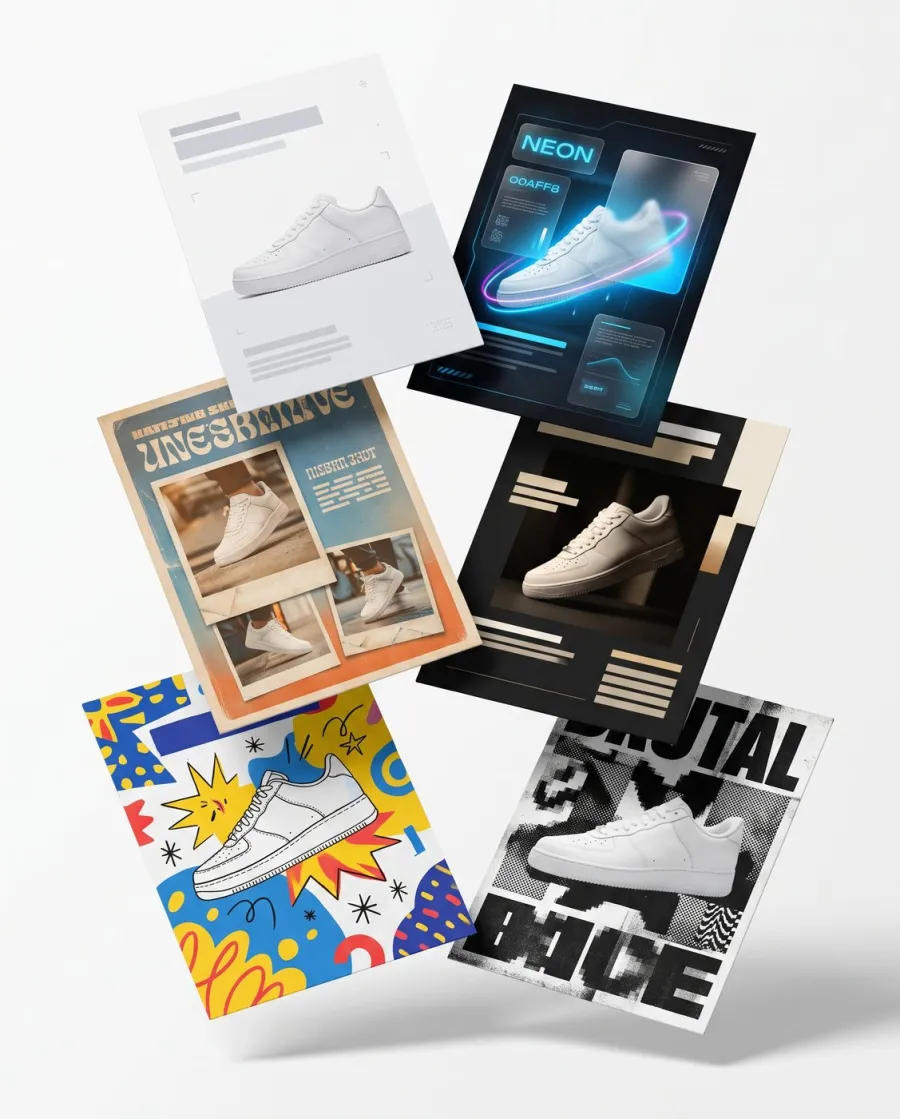
Six ad designs for the same white sneaker in different styles
Build your portfolio while you learnAll 8 projects come together in one launch kit on your personal link. Send it to a client or employer in one click

Real practice · $0

Your own real store to practice on

Every student gets a free online store on the Sellvia platform, with products already in it.

  • Real work, not exercisesDesign the brand, product photos, posts and ads for a product in your own store
  • Proof for your portfolioShow a live store wearing your design, not homework
  • Yours to keepThe store stays yours after the course. Keep growing it or use it to sell
[When every task is done]

A CV page and a certificate employers can check

Your certificate in your name, on a CV page with your launch kit, skills and tools

  • A credential ID anyone can verify
  • Add to LinkedIn in 2 clicks
  • Your 8 projects and 20+ tools on one link
5:34
[Free preview · lesson 1]

See lesson 1 before you sign up

What clients pay for now, how 5 designers became 1, and the 4-step method behind every lesson

  • 10–15 minutes, on your phone or laptop
  • Pick the product you’ll design for through the course
  • In lesson 2, make your first sales post with free tools

From a blank page to a full product launch

12 lessons in 3 stages. One product from your store carries through all of them

12lessons of 6–16 min
~2 hoursin total
25AI tools
8portfolio projects
  1. VisionSee like a designer, then direct AI
  2. 1The AI design market: what you can earnYou'll create: One product from your store and a one-paragraph briefClaudeGeminiCanvaRecraft16 min

    What AI design work pays, what clients are really buying, and how five designers became one. The loop you'll use in every lesson (brief, standard, generate, judge) and which free tool does which job.

  3. 2Your first sales creative in 15 minutesYou'll create: A feed post and a story for your productCanvaRecraftGeminiAdobe Firefly11 min

    Free accounts, the words first, then three ways to make a sales post with your real product: a clean background, an AI scene or graphic elements. Plus the story version and a clean export.

  4. 3Seeing like a designer: color and compositionYou'll create: Version 2 of your post, fixed for color and compositionCanvaHuemintCoolorsWebAIMClaude8 min

    The color wheel, the 60-30-10 rule, contrast and one focal point. Alignment, whitespace and reading paths, then the squint test and a live fix of a real post.

  5. 4Seeing like a designer: typography and stylesYou'll create: Version 3 of your post, your style and a reference boardGoogle FontsFontjoyIdeogramGeminiPinterest9 min

    Three font families and their moods, four type rules, free AI font tools and nine styles you'll see everywhere. Then you choose the style that fits your buyer.

  6. 5Directing AI: prompts, tool quirks and your brand brainYou'll create: A brand brain in Claude and 10 tested promptsClaudeGeminiIdeogramRecraftMidjourneyKrea14 min

    The prompt formula, the same prompts on free and paid tools, which tool does which job, one change at a time, and a brand brain in Claude that remembers your product, style and palette.

  7. Your brandA brand and a product shoot, without a studio
  8. 6Brand identityYou'll create: A mini brand kit: logo, palette, fonts and a one-page guideRecraftIdeogramInkscapeCanvaClaude10 min

    Brand attributes, a moodboard, the final palette and fonts. Logo directions in Recraft and Ideogram, who owns an AI logo, vectorizing, graphic elements and a one-page brand guide.

  9. 7AI product photographyYou'll create: A library of 5–8 product shots in one styleGeminiPhotopeaUpscaylKrea9 min

    Product photos without a studio: five shot types, light and camera words, scenes, background removal, retouching and upscaling. And the honesty rule for AI product images.

  10. 8Marketplace product cardsYou'll create: A full product card: a main image and 5–6 slidesCanvaFigmaClaude11 min

    How buyers scan a marketplace, the rules for the main image, a main image that gets clicked, the slide structure, benefit text with Claude and the thumbnail test.

  11. Your launchEverything a product needs to sell, and proof you made it
  12. 9Social media designYou'll create: A template set, a carousel and a month of postsCanvaClaude8 min

    Formats and sizes, content pillars and the grid, a template system, carousels, stories and visual hooks. Then a month of posts made in one batch.

  13. 10Ad creativesYou'll create: Six ad variants in three formats and one animated adClaudeGeminiAdobe FireflyKlingMeta Ads Manager10 min

    Ad anatomy, five angles that sell, variants with a hypothesis, one design in every format, one creative that moves, how not to get rejected and how to read the results.

  14. Want ads that move? AI Video Creator is a separate free course →
  15. 11Landing pageYou'll create: A live landing page for your productFramerCanvaGoogle StitchClaudeSquoosh6 min

    A page that keeps the ad's promise: what goes on it, writing it with Claude, phone first, building it with free AI tools, fast images, and publishing it with links to your store.

  16. 12Automation, portfolio and first clientsYou'll create: A portfolio, a case study, a price list and five pitchesClaudeCanvaGammaBehance11 min

    Let Claude run the repeat work, check what's yours to sell, then turn the course into a case study, a portfolio, a price list and your first client pitches.

Certificate when every task is accepted

One set of skills, your way to earn

Get hired, take on clients, or grow your own business. Start with one path and switch any time

A designer presenting printed brand layouts to a client at a studio tableCareer or freelance

You want paid design work

The challenge

No experience, no job. No job, no experience. You need proof you can do the work

What you'll leave with

8 portfolio projects in one launch kit. Graphic designers on Upwork charge $15 to $150 an hour. Portfolio and packages move you up5


A shop owner holding her product in new branded packaging with a blue ribbonOwn business

You have a store or a product

The challenge

Your photos look homemade, and hiring a designer for every post costs more than the post earns

What you'll learn

Make your own brand, product photos, posts and ads, all in one style

What our students say

“By lesson 7 I had product photos that looked like a real shoot. Now I make them for two local shops”

Maria K.Was a retail cashier

“My store finally looks like one brand. I made the logo, photos and ads myself”

James T.Sells home goods online

“I can’t draw at all. My launch kit link got me my first design interview”

Priya S.Was a teacher

Questions before you start

Do I need design experience or drawing skills?

No. Lessons 3 and 4 train your eye with simple rules. AI does the drawing, you make the decisions

How much time do I need?

About 2.5 hours for the whole course: 12 lessons of 10–15 minutes. Do one a day or several in an evening. Your access doesn’t expire

Is it really free?

Yes. Every lesson, your practice store and your certificate cost $0, and we don’t ask for a card. Sellvia makes money when stores sell, and good design helps them sell

Will I have to pay for AI tools?

Not to learn. You start with 3 free accounts: Claude, Gemini and Canva. When a paid plan really matters, the lesson says why. Before you sell work to a client, check the tool’s license: some free plans keep the rights to your images

Do I need my own store or product?

No. In lesson 1 you pick one product. The free Sellvia store that comes with the course already has products in it

What do I have at the end?

A full launch kit for one product: a sales post, a brand kit, product photos, a marketplace card, social posts, an ad set and a live landing page. Plus a case study, a price list and a certificate you can add to LinkedIn

Should I take the AI Video Creator course too?

Lesson 10 makes one animated ad. If video is the part you want to go deep on, AI Video Creator is a separate free course

Will this get me clients or a job?

We don’t place students. What gets you the first client or interview is finished work, and that’s what you walk out with

Your first launch kit starts here

12 lessons. About 2.5 hours. $0 to start. Just your email, instant access

A designer at his desk with a graphics tablet and a sneaker campaign on screenA frosted perfume bottle floating among blue and white silk wavesA designer laughing in front of a giant fashion billboard she designed